EasyMedStat 4.8: pictures and documents in the eCRF, one-click patient table export, and your own logo on PDFs
This new version answers three requests that came up repeatedly from research teams: collecting images and documents directly in the case report form, quickly retrieving a monitoring view in Excel, and personalising exported documents with your organisation’s branding.
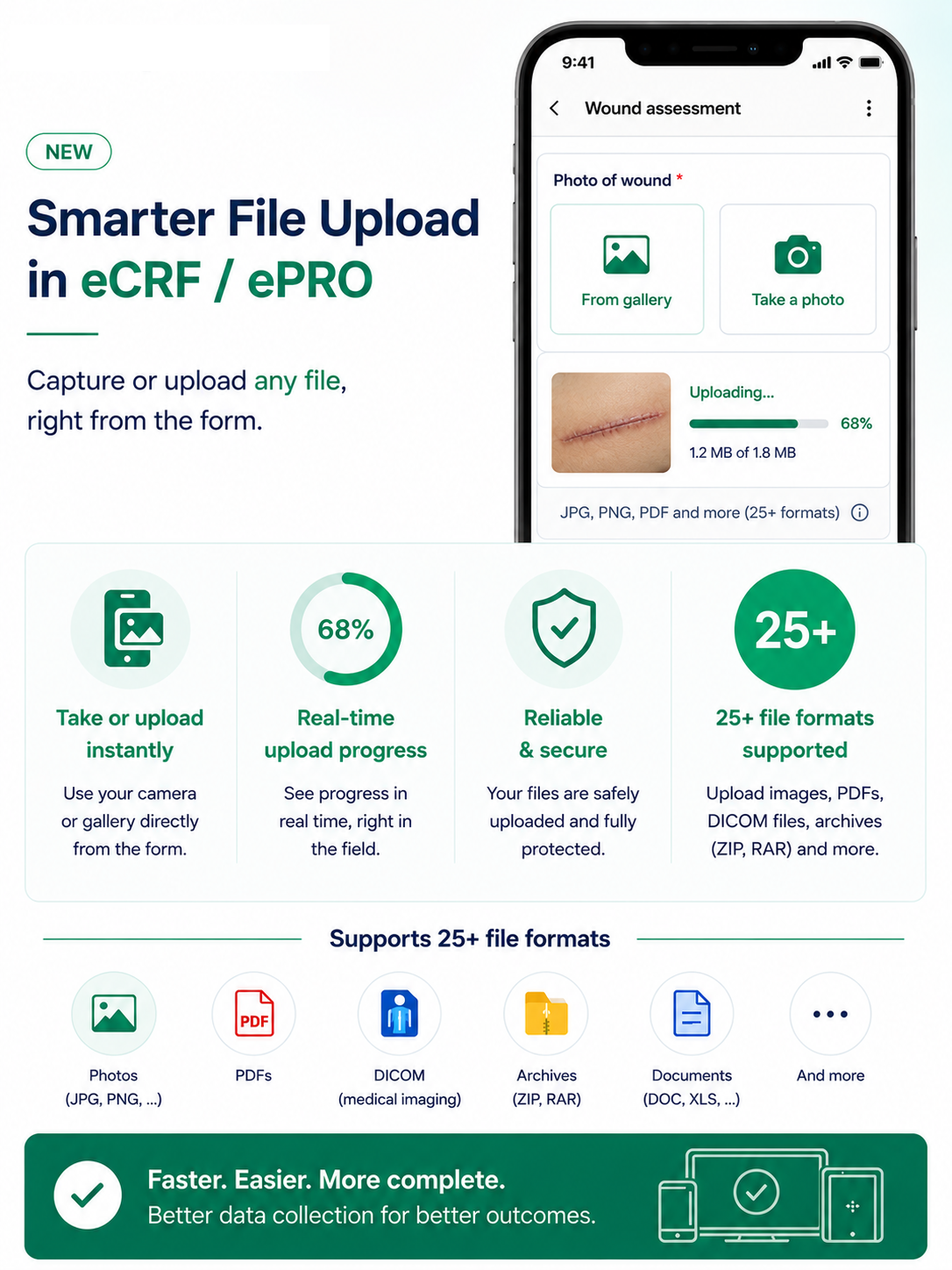
Collect pictures and documents directly in the eCRF
EasyMedStat introduces a new variable type: Picture / File. Like any other variable, it is created from the variable management screen, added to an eCRF category or an ePRO questionnaire, and benefits from the same conditional display, locking and monitoring rules.
In practice:
- You choose the accepted formats, either all images or a specific selection among the formats already supported by the platform.
- Each variable holds one file, up to 5 MB. A new upload replaces the previous one, and the file can be deleted to return to an empty value.
- On mobile in ePRO, a single button opens the phone’s native options: camera, photo gallery or file browser. The patient takes the picture, the upload starts immediately, and a progress bar follows it through.
- Images are displayed as a thumbnail and can be opened full screen. Other files appear as a card showing their name and size.
- In the eCRF, the pseudonymisation window already used for patient record pictures lets you mask a face, a tattoo or any identifying area before sharing.
The Replace and Delete actions follow exactly the same rules as any other data: they disappear as soon as the variable, the category, the patient or the series is locked. Nothing escapes locking.
One important point to understand: outside data entry, the variable behaves as a boolean. In the All patients table, the patient PDF export, the monitoring report, automations and conditional display rules, the variable reads as Yes when a file is present and NC when it is not.
Tabular exports contain the metadata: presence, name, type, size, upload date, but not the files themselves. The API exposes the variable as a read-only boolean. This is a deliberate choice: a picture is not analysable data, and we would rather exclude it explicitly from the statistical modules than let anyone believe it could be used there. In statistical tests, dynamic variables, bulk update or randomisation, these variables remain visible but disabled, with a tooltip explaining why.

Export the "All patients" table in one click
The Export data module remains the reference tool for preparing a complete dataset ahead of an analysis. But day to day, a clinical research associate or a study coordinator often needs something else: to retrieve, exactly as it is, what they have in front of them, in order to send it to a site, discuss it in a meeting or rework it in Excel.
A download button therefore appears at the top right of the All patients table. One click, and you get an Excel file that faithfully reproduces your view:
- every patient matching the active filters, including those on the following pages;
- the column order, the row order and the sorting you applied;
- row colours, carried over to the first column;
- for each category, four monitoring columns: completion, signed, verified, locked.
Values are converted so they can be used straight away: sex becomes Male or Female, age becomes a number, dates are formatted as YYYY-MM-DD, statuses as YES / NO. The file is named automatically with the series name and a timestamp.
The export is limited to 1,000 patients. Beyond that, a message points you to the Export data module, designed for those volumes. It requires the Export data permission and strictly respects column-level permissions: what you cannot see on screen does not appear in the file. Every download is recorded in the audit trail.
Your documents, your logo
The logo configured in the series parameters, until now used for ePRO only, now applies to the patient PDF export. It replaces the EasyMedStat logo at the top right of the first page, right-aligned and resized without distortion.
One field, two usages: no extra configuration to manage. If no logo is defined, the EasyMedStat logo remains displayed as before. The behaviour is identical in Test Mode and Production, and the feature is available on all plans.
For documents sent to an ethics committee, a sponsor or an authority, this personalisation changes how the deliverable is perceived.

Fixes and improvements
This version also fixes several points reported by our users and our team:
- a picture used as a variable description is now correctly deleted from the server when its category is deleted, aligning this behaviour with variable deletion;
- in the excluded patients view, columns no longer overlap and values are no longer shifted when some display options are unchecked;
- improved calculation of patient record progress and categories.
A question about any of these new features?
Our support team is at your disposal, and our help centre grows with every version.
Share this article